
TWO PHOTOS · ONE STUDIO PERFORMANCE
Alors on Danse AI Video Generator
Make an Alors on Danse AI video with you on the keys and a friend taking the spotlight. Add one photo for each performer, pick your settings, and turn the white-studio template into a shareable MP4 with its reference audio.
5–30 seconds · Vertical or horizontal · From 4 credits · Failed videos refunded
Photo 1 · Keyboard player
One clear face, with shoulders and outfit visible
Photo 2 · The expressive partner
One clear face for gestures and the close-up
JPG, PNG or WebP, up to 20 MB each. Short edge at least 300 px; longest edge at most 6000 px. Use one person per photo.
This video uses 138 credits. A failed video returns the full charge.
Signup and admin gift credits are accepted, alongside purchased or subscription credits. Your eligible balance must cover the displayed price.
Your photos, the familiar studio scene
This Alors on Danse AI video generator recasts a fixed performance: a keyboard player keeps the rhythm while their partner gestures and moves toward the camera. The reference supplies the staging and timing, so you can focus on choosing the two people.
| You provide | Two separate photos, one person in each |
|---|---|
| The cast | Photo 1 plays the keyboard; Photo 2 performs the reactions and close-up |
| Video length | 5, 10, 15 or 30 seconds |
| Download | MP4, 9:16 or 16:9; 480p/720p on all models, 1080p on Seedance 2.0 and 2.5 |
| Sound | The matching reference audio is included in the finished MP4 |
| Credits | From 4 credits, depending on model, resolution and length |
Alors on Danse AI video examples
Watch how different casts change the mood of the Alors on Danse AI meme. These are community remakes and an example published by another generator, not videos made with Opus 5.5 Video. Play with sound to compare the scene and timing.
Source: Yapayzekaserisi (@yapayzekaserisi) ↗
Source: Yapayzekaserisi (@yapayzekaserisi) ↗
Source: Yapayzekaserisi (@yapayzekaserisi) ↗
Source: alorsondanseai.org ↗
These examples illustrate the trend. Our current template uses the vertical Kratos and Zeus reference shown above; other versions can have different framing, cuts and results.
How to make an Alors on Danse AI video
You do not need to find a reference clip or write a prompt. The Alors on Danse AI video workflow keeps those parts ready inside the generator.
- 01
Cast the two performers
Upload one portrait for the keyboard player and one for the expressive partner. Compare the role thumbnails with the template preview; use Swap performers to reverse the assignment.
- 02
Choose the clip you want
Pick a model, length, resolution and format. Start with a short clip to check your photos. The credit amount updates with your choices before you generate.
- 03
Preview and download
Sign in and generate. Your recent videos keep the task available while it processes. When it finishes, play the result and download the MP4 with audio.
Who plays which part in your Alors on Danse AI video?
The scene works because the two performances are different. Give each photo a role, then let the reference guide the movement through the keyboard shot, reactions and camera changes.
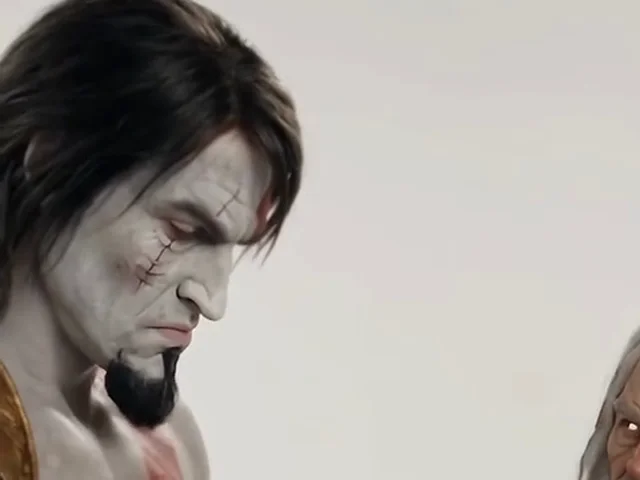
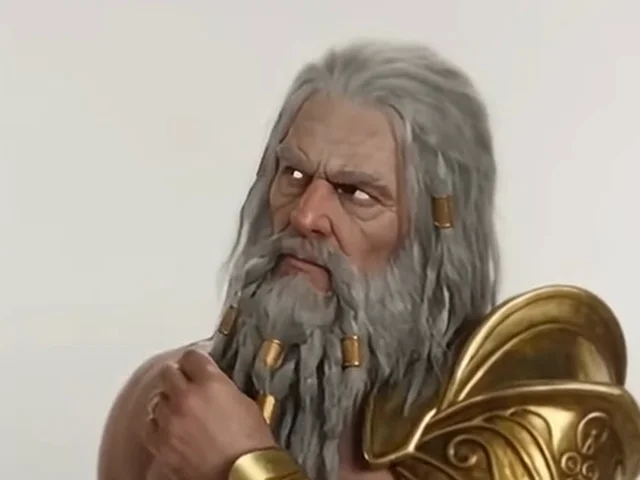
The studio, table, laptop, keyboard and performance timing stay in the template. AI generates the replacement faces and bodies; small differences between shots can still happen.
Pick a length and format for your studio remix
A 5- or 10-second clip is a practical first check of your cast. Choose 15 or 30 seconds when you want more of the reference performance. Vertical 9:16 fits a phone screen; horizontal 16:9 gives the duo a wider stage.
For 30 seconds, Seedance 2.0 Mini, Fast and 2.0 generate two 15-second parts that are joined into one MP4. The join can show a visual change. Seedance 2.5 processes the full reference after its asset review.
Alors on Danse AI video credits by model
These are the complete charges at 720p. Choose 480p for a lower quote, or 1080p on Seedance 2.0 and 2.5 for a larger frame. The generator always shows the amount for your current settings.
| Video model | 5 seconds | 10 seconds | 15 seconds | 30 seconds |
|---|---|---|---|---|
| Seedance 2.0 Mini | 8 | 15 | 23 | 45 |
| Seedance 2.0 Fast | 28 | 55 | 82 | 164 |
| Seedance 2.0 | 46 | 92 | 137 | 274 |
| Seedance 2.5 | 69 | 138 | 207 | 413 |
One charge covers the whole video, including a 30-second two-part result. If review, generation or finishing fails, those credits are returned. A completed result is not automatically refunded for a subjective style or likeness preference.
Credit packs start at $5 for 50 credits; monthly subscriptions start at $9. You can also use unexpired signup or admin gift credits. Videos made before your first purchase carry a moving watermark.
See credit plans ↗Your Alors on Danse AI video with the beat included
The final download includes the audio from the matching template clip. Listen to the preview before starting: the same segment supplies the soundtrack for your selected length. You do not have to line up a separate track to play the finished MP4.
Music availability on TikTok, Reels and Shorts depends on the platform and your use. Generating a video does not grant rights to the song or reference material. Check your posting permissions, especially for advertising.
Choose photos that keep the two faces distinct
For an Alors on Danse AI video, the face must remain readable in a wide studio shot and during movement. Two simple portraits give the model a clearer starting point than busy group photos.
- Use one person per image. Keep the face unobstructed, evenly lit and in focus; avoid sunglasses, hands over the face and strong beauty filters.
- Include shoulders and some clothing. A very tight face crop gives less information for replacing the body in the studio.
- Choose noticeably different portraits. Similar faces and matching outfits can make it harder to check who kept which role.
- Review the hands, keyboard and close-up. AI can change fine details or facial features. A shorter clip helps you evaluate the photos before spending more credits.
- Use images you have permission to upload. Seedance 2.5 reviews both photos and the reference before the video starts; a rejected task is refunded.
Which Alors on Danse trend is this?
The white-studio meme follows a comedy sketch with Stromae and Jamel Debbouze: a tiny keyboard, a laptop and two contrasting performers. An Alors on Danse AI meme puts a new cast into that recognizable setup. This page uses a community remake as its motion reference.
Searching for the Alors on Danse TikTok trend can also bring up the slowed group dance. This generator makes the studio duet. The song title is commonly translated as “so we dance”; the template is about the playful studio performance.
Alors on Danse AI video FAQ
- How do I make an Alors on Danse AI video from photos?
- Add two separate portraits, assign the keyboard and partner roles, then choose your model, format and length. Sign in, check the displayed credit charge and generate. The result appears in your recent videos with an MP4 download.
- Which photos should I upload?
- Use a clear, front-facing portrait of one person per photo. JPG, PNG and WebP are accepted up to 20 MB each, with a short edge of at least 300 px, a longest edge no greater than 6000 px, and an aspect ratio between 0.4 and 2.5.
- Does the Alors on Danse AI video include the song?
- The MP4 includes the corresponding reference clip’s audio. Exact mouth movement can vary. No music license is included, so check the rules for your intended platform and use.
- Can I use a prompt instead of two photos?
- This tool requires two photos. The scene and performance prompt are already configured around the studio reference. Use the main video generator if you want to describe a different scene.
- How much does an Alors on Danse AI video cost?
- Generation starts at 4 credits. At 720p, a 10-second clip costs 15 credits on Seedance 2.0 Mini, 55 on Fast, 92 on 2.0, or 138 on 2.5. Your chosen length and resolution determine the final quote; failed jobs are refunded. Unexpired signup and admin gift credits can pay for a video without a purchase. Your eligible balance must cover the quote, and free-account videos carry a moving watermark.
- Can I make a 30-second vertical video?
- Yes. Choose 30 seconds and Vertical 9:16. Seedance 2.5 uses one full-length reference job after review; the 2.0 models join two 15-second parts. You can also choose horizontal 16:9, which asks the model to widen the studio.
- Why do the faces or keyboard hands look different?
- The model generates new frames from your photos and the reference, so identity, fingers and small props can drift. Use clearer portraits, check the photo assignments and test a shorter length. The tool does not guarantee exact likeness or perfect lip sync.
- What does Alors on Danse mean, and is this the original video?
- The title means “so we dance.” The studio meme comes from a sketch with Stromae and Jamel Debbouze. The generator uses a community AI remake as its template, while the examples are credited to their publishers. It is not the official music video.
Cast your own Alors on Danse AI video
Choose your two portraits, preview the studio scene and check the quote. Your next version starts with the people you put on each side of the keyboard.
Back to the generator ↑